

How to transfer data from Android to iPhone
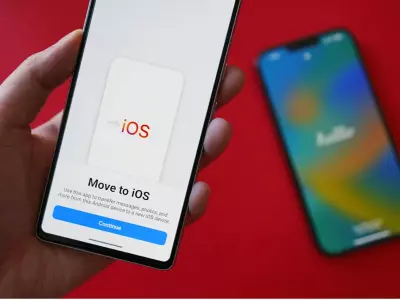
Switching phones is always exciting – especially if you’re switching from Android to iPhone. Your new (or refurbished) iPhone offers a completely different experience, but what do you do with all your contacts, photos, and messages from your old phone?
In this guide from Hop.bg, we’ll show you how to easily transfer data from Android to iPhone without losing a single important file.
1. What can you transfer from Android to iPhone
Before you get started, it’s important to know that Apple allows the transfer of most types of information:
Contacts and calendar
Photos and videos
Messages and chats
Saved browser bookmarks
Emails and accounts
Some apps (if available in the App Store)
2. Method 1: With the Move to iOS app
The most convenient way to migrate your data is through the free Move to iOS app, created by Apple.
2.1. Install Move to iOS
Open the Google Play Store and download Move to iOS.
2.2. Prepare your devices
Fully charge both phones.
Connect them to a stable Wi-Fi network.
If you are using a refurbished iPhone from Hop.bg, make sure it has been reset to factory settings.
2.3. Start setting up your iPhone
When you first turn it on, select "Apps & Data" → "Move Data from Android".
2.4️. Enter the connection code
A code will appear on the iPhone screen that you need to enter in the Move to iOS app on Android.
2.5️. Choose what to transfer
Check the data you want to transfer - contacts, photos, messages, etc. Wait until the process is complete.
Tip: If you are transferring large files, connect the chargers of both phones to avoid interruptions.
3. Method 2: Manual Transfer via Google Account or Cloud
If you prefer to control the process yourself, you can transfer data manually.
Contacts
Sync contacts with your Google account on Android.
Sign in with the same account on iPhone:
Settings → Contacts → Accounts → Add Account → Google.
Photos and Videos
Upload them to Google Photos or Google Drive from Android.
Then install the same app on iPhone and sign in with the same account.
Documents and Files
Use Dropbox, OneDrive, or iCloud Drive for secure transfer.
4. Method 3: Via Computer (USB Cable)
Connect your Android phone to your computer and copy photos, documents, and other files.
Then connect your iPhone and use Finder (on Mac) or iTunes (on Windows) to upload the files back.
This method is suitable if you don’t have a stable internet connection or prefer to do everything offline.
5. Useful tips from Hop.bg
Check if you have enough free space in iCloud or on the iPhone itself.
Use a Wi-Fi connection, not mobile data.
If you purchased a refurbished iPhone from Hop.bg, all settings will be reset, so you can start the migration right away.
Once you're done, download your favorite apps from the App Store.
Transferring data from Android to iPhone is no longer a challenge. With the help of Move to iOS or cloud services, you can make the migration quick, easy and safe.
If you are considering switching to an iPhone, but don't want to pay full price for a new model, at Hop.bg you will find refurbished iPhone devices with a warranty and excellent performance - the ideal combination of quality and affordability. On the Hop.bg website you can view all available offers for refurbished equipment at affordable prices. Also visit our stores in Sofia, Plovdiv, Pleven, Varna and Ruse and see for yourself the quality of the wide variety of products we offer.
Previous post Next postLast publications
Last publications



139.00 €
129.00 €
309.00 €
269.00 €
LaptopDell Latitude 7520, i5-1145G7, 16GB, 512GB SSD, 15.6" Touchscreen IPS Full HD 1920x1080
- Refurbished
529.00 €
489.00 €
