

Useful iPad features that many people don't use
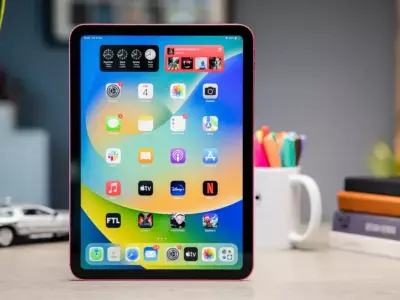
iPad has long been more than just a device for watching videos and surfing the Internet. With modern versions of iPadOS, it has become a powerful tool for work, learning, and creativity. However, many users use only a small part of its capabilities.
In this article, we will show you several useful iPad features that often go unnoticed, but can significantly improve productivity and convenience at work.
1. Split View – working with two applications at the same time
One of the most useful features in iPadOS is Split View, which allows you to use two applications on one screen.
How to activate it:
Open the first application.
Swipe up slightly to display the Dock.
Hold the second application and drag it to the left or right of the screen.
When is it useful:
taking notes while reading an article
chatting while working
comparing documents
This feature turns the iPad into an almost complete multitasking platform.
2. Slide Over – quick access to apps
Similar to Split View, Slide Over allows you to open an app in a small floating window.
This is especially convenient for:
quickly replying to messages
checking email
using a calculator or notes
You can slide the window from the left or right of the screen and even switch between multiple apps.
3. Quick Note – quick notes from any app
The Quick Note feature allows you to create a note without leaving the current app.
How to use it:
Swipe from the bottom right corner of the screen towards the center.
A small quick note window will open.
This is very useful for:
online learning
research
collecting ideas
All notes are automatically saved in the Notes app.
4. Drag & Drop between apps
Few people know that the iPad allows you to drag content between apps.
For example, you can:
drag a photo from Photos to an email
move text from Safari to Notes
add a file to a chat
This makes working with documents and files much faster and more intuitive.
5. Scan documents with the camera
iPad can also serve as a document scanner.
How to do it:
Open the Notes app.
Select “Scan Documents”.
Point the camera at the document.
The device automatically:
crops the document
improves contrast
creates a PDF file
This is extremely convenient for invoices, contracts and notes.
6. Live Text – copy text from photos
With the Live Text feature, you can copy text directly from a photo.
Examples:
a phone number from a business card
text from a book
address from a document
Just hold down on the text and a copy option will appear.
7. Universal Clipboard – copy between Apple devices
If you use your iPad with a Mac or iPhone, the Universal Clipboard feature allows you to copy content on one device and paste it on the other.
For example:
copy a link from your iPhone
paste it on your iPad
This works automatically if the devices are on the same Apple account.
8. Stage Manager – better window organization
On newer iPad models, the Stage Manager feature allows for more convenient management of multiple applications.
With it, you can:
work with multiple windows at the same time
group applications
switch between workspaces
This makes the iPad even closer to a desktop computer as a working environment.
Why are these features useful when working with an iPad?
Many users use the iPad primarily for entertainment, but with the right features, it can be:
a work tool
a learning device
a digital notebook
a mobile office
Especially when you use a quality refurbished device, you get a powerful tablet at a significantly more affordable price.
iPad has dozens of useful features that can significantly improve the way we work and organize our tasks. From multitasking with Split View to smart features like Live Text, iPad offers many more options than most users use.
If you want to get the most out of your device, start experimenting with these features - you will find that iPad can be a much more powerful tool than you imagined.
And if you are looking for a quality iPad at a better price, check out the offers for refurbished Apple devices at Hop.bg and find a model that combines performance, reliability and an excellent price.
Previous post Next postLast publications




Last publications




LaptopApple MacBook Pro A2485 (2021) Space Gray, Apple M1 Pro, 16GB, 512GB SSD, 16'' Liquid Retina XDR 3456x2234
- Refurbished
799.00 €
749.00 €
Mobile workstationHP ZBook Fury 15 G8, i7-11850H, 32GB DDR4, 512GB SSD, 15.6'' IPS Full HD 1920x1080, RTX A2000
- Refurbished
989.00 €
939.00 €
LaptopDell Latitude 7480, i7-7600U, 16GB, 256GB SSD, 14'' IPS Full HD 1920x1080
- Refurbished
259.00 €
239.00 €
LaptopDell Latitude 7430, i5-1245U, 16GB, 256GB SSD, 14'' IPS Full HD 1920x1080
- Refurbished
509.00 €
459.00 €
Laptop Dell Latitude 7420, i7-1185G7, 32GB, 512GB SSD, 14" Touchscreen IPS Full HD 1920x1080
- Refurbished
439.00 €
389.00 €
